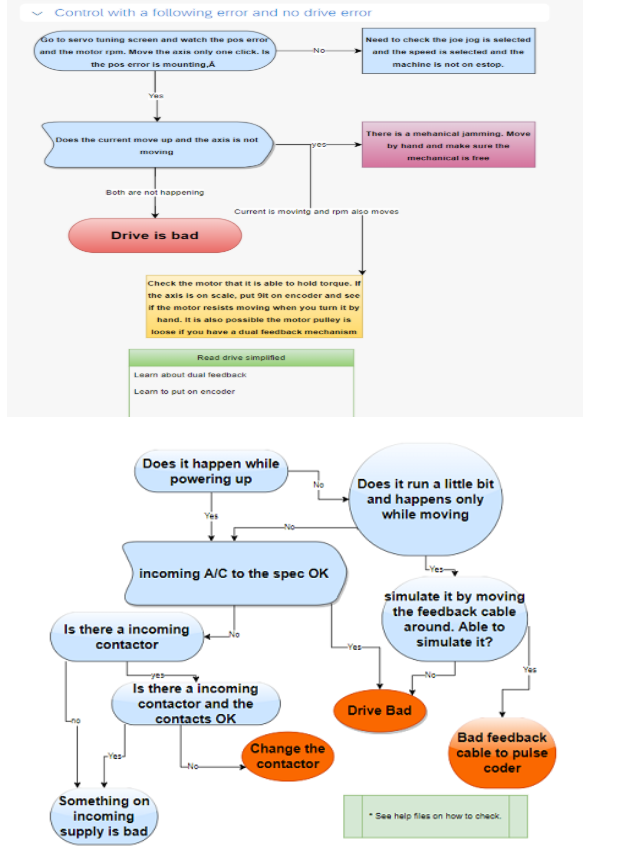
These are real troubleshooting flowcharts used for decades by CNC OneStop. DrMachines AI converts this logic into an intelligent assistant that helps you diagnose issues fast—and avoid expensive service calls.
DrMachines AI is built from decades of hands-on CNC troubleshooting on Studer grinders, Fanuc/Siemens controls, hydraulics, spindles and servo systems. It transforms thousands of troubleshooting cases into an AI assistant that narrows faults down intelligently.
DrMachines AI follows the same structured logic used in the field at CNC OneStop: Alarm paths, symptom-based decision trees, servo diagnosis, spindle logic and mechanical isolation steps.
DrMachines AI uses the same proven troubleshooting decision trees that CNC engineers have followed for decades. These flowcharts were created from 30+ years of real-world service on Studer grinders, Fanuc/Siemens controls, Mitsubishi systems, hydraulics, spindles, and servo drives.
Every time you describe an issue, the AI follows a structured YES/NO diagnostic path just like the charts it was trained on. This process helps isolate the true root cause quickly—often saving shops thousands of dollars in unnecessary service calls, part swaps, or downtime.
These are real troubleshooting flowcharts used for decades by CNC OneStop. DrMachines AI converts this logic into an intelligent assistant that helps you diagnose issues fast—and avoid expensive service calls.
Email: support@drmachines.com